Smart Locks: How to Choose the Right Type for Every Door
By Tracey Gold · 27 July 2026
Most smart lock buying goes wrong at the same point. The app gets tested, the finish gets chosen, and nobody checks whether the door may hold that lock at all.
A smart lock is building hardware before it is technology. It has to survive the door cycle, the weather and the fire code. The phone part is the easiest piece of the whole job.
Get that order backwards on a commercial door and the fire officer strips out the hardware you just paid to fit.
This guide covers the smart lock types, how each one knows who you are, the grades worth reading, and where the codes say each type may go.
A Smart Lock Is Still a Lock First
The mechanics carry the load
Every smart lock has a bolt or a magnet doing the physical work. The electronics only decide when that part moves.
Strip out the radio and you are left with a deadbolt, a mortise case or a magnet. That hardware is what an attacker meets.
Three questions decide the choice
Work through these before you open any product page.
- What is the door? Timber, hollow metal, aluminium or glass changes the whole shortlist.
- Who needs in? Two people with phones is a different problem from two hundred staff with cards.
- What happens in a fire? This one is answered by code, not by preference.
Smart Lock Types by How They Meet the Door
How a smart lock mounts sets the ceiling on what it can do.
Retrofit deadbolt units
These clamp over the inside of an existing deadbolt and turn the thumbturn by motor. The outside of the door does not change.
- Fastest of all the types to fit, and it can be reversed later.
- Keeps the existing key and cylinder. - Security is capped by the deadbolt already there. - A weak strike stays weak.
Replacement deadbolts
Here the whole deadbolt goes, and the smart lock is the deadbolt. This is the most common format for a single commercial door.
- Lets you upgrade bolt throw and strike at the same time.
- Usually carries its own keypad or card reader on the outside face.
Mortise and lever smart locks
A mortise case sits in a pocket cut into the door edge. Lever versions put the smart lock into the handle itself. Both of them need a door that has been prepared for the case in advance.
- Standard on hotel, office and multi-tenant doors.
- Heavier duty cycle than any retrofit unit. - This is a design decision, not a weekend job.
Magnetic locks and electric strikes
Neither of these is a lock in the ordinary sense of the word. A magnet holds the whole leaf tight against the frame. An electric strike frees the frame side instead of the door side.
- Maglocks: no moving parts, and they hold across the whole leaf.
- Electric strikes: keep the existing lockset and power the keeper.
- Both: these are access control parts, so listing rules apply.
Smart padlocks
This is the portable end of the family. A Bluetooth padlock swaps the key for a phone credential on gates, cages and containers.
- No door prep, no wiring and no power run to pay for.
- Good where the asset moves, or the lock does.
How a Smart Lock Knows Who You Are
Every smart lock has to answer one question at the door: may this person come in?
Codes and keypads
A code needs no hardware on the user's side, which is why keypads sell so well. It also needs a rotation policy, because codes leak. They leak fastest where staff turnover is high.
Cards, fobs and phones
These can be issued and revoked from one place. That is where a smart lock stops being a product and starts being a system.
- Cards suit staff and contractors who already carry a badge.
- Phone credentials suit short-term visitors and access granted from a distance. - Both leave an audit trail, which a mechanical key never does.
Biometrics
Fingerprint readers drop the credential entirely, but they raise data questions that vary by country, so check local rules first.
The mechanical override
Most good hardware keeps a key cylinder behind a cap, and it is the cheapest insurance a smart lock can carry.
Reading Grades and Listings on a Smart Lock Spec Sheet
Two rating systems turn up on the same page, and they measure different things.
ANSI and BHMA product grades
BHMA sets product grades of 1, 2 or 3, with grade 1 the highest. The grades come from steadily tougher performance benchmarks in each standard.
- Testing is performance based: cycle, strength, security and finish.
- Certification is independent lab testing, and a maker need not be a BHMA member to certify.
The residential A, B and C label
Home hardware carries a second scheme, and it reads as three letters in a fixed order.
- Security, durability, finish — one rating each.
- A is Best, B is Better, C is Good. - The standards are A156.39 for home locksets and latches, and A156.40 for home deadbolts. - A label reading ABA means best security, better wear, best finish.
UL 294 for access control
Where a smart lock joins an access control system, UL 294 applies. Its seventh edition, dated 31 January 2017, sets four performance levels, numbered I to IV.
- The levels cover physical and destructive attack testing.
- They also cover the security of the encrypted line itself.
- Endurance cycling and standby power use the same four levels.
| System | Applies to | Scale | Reads as |
|---|---|---|---|
| ANSI/BHMA grade | Locksets, deadbolts, exit devices | Grade 1 to 3 | 1 is highest |
| BHMA home label | Home locks and deadbolts | A, B, C in three categories | Security, durability, finish |
| UL 294 | Access control system units | Level I to IV | Attack, line security, endurance, standby |
| UL 325 | Door and gate operators | Listed or not | Safety only, not security |
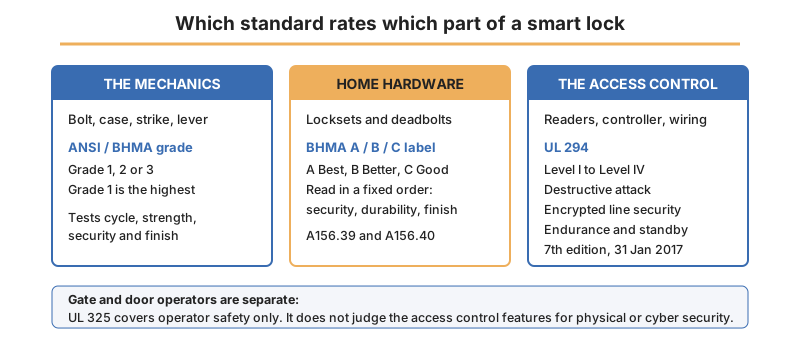
Note the last row: under UL 325 alone, the access control features on a gate are not judged for physical or cyber security at all.
Fire Codes Decide Where a Smart Lock May Go
This is the point where a good-looking spec gets rejected. Egress rules are not a formality, and they beat the security brief.
The rule that catches buyers
Locks in a means of egress cannot need a key, a tool, or special knowledge or effort from the egress side. That rules out a keypad or card reader on the inside face of an egress door. Extra protection measures have to sit around it before that is allowed.
The releasing action itself is limited in the same way. One motion, in a single linear or rotational direction, must release every latch and lock on the leaf.
Delayed egress locking
This is allowed where internal security demands it, such as stock loss or specialised patient care. The door holds for 15 or 30 seconds, then releases.
Sensor release
The leaf is locked against entry, and a sensor on the egress side unlocks it as someone walks up. Where that sensor fails, a manual release such as a push button has to be there as backup.
Door hardware release
The leaf is held by a magnet and released by hardware fixed to the leaf itself, so to the person leaving it behaves like an ordinary door.
| Arrangement | What holds the door | What releases it |
|---|---|---|
| Delayed egress | Electrical locking system | Push, then 15 or 30 second delay |
| Sensor release | Electrical locking system | Occupant sensor, with manual backup |
| Door hardware release | Magnet | Hardware on the leaf |
| Elevator lobby locking | Electrical locking system | Twelve separate code criteria |
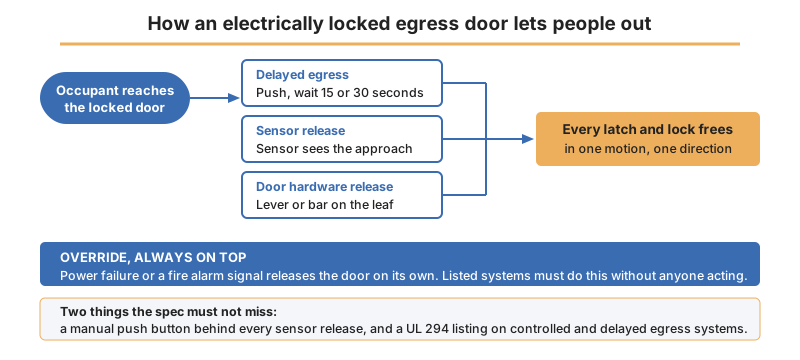
Building code puts a hard backstop over all of this. Controlled egress and delayed egress locking systems must be listed to UL 294. They must also release on their own when power fails or the fire alarm sounds.
Power, Failure and Fitting
Fail-safe or fail-secure
A fail-safe smart lock unlocks when power is lost, and a fail-secure one stays locked. Egress doors take fail-safe, because the code demands release on power failure.
Batteries and standby
A battery unit is simple until the battery dies mid-shift. A wired unit moves the problem to the power supply, which is why UL 294 grades standby power at all.
- Fit external terminals or a key override on battery units.
- Size the standby supply for the whole door, not just the smart lock.
Cyber exposure
A networked smart lock is a networked device. UL 2900-2-3 exists because security and life safety signalling products are software products now.
Frequently Asked Questions About Smart Locks
Does a smart lock need to be BHMA certified?
Not legally, but the grade is the only comparable measure of how the hardware performs. Without it you are comparing marketing copy.
Can I put a keypad on the inside of a fire exit?
That is not allowed on its own. Egress hardware cannot need special knowledge or effort from the egress side. A code entry on that face needs one of the recognised locking arrangements around it.
What happens to a smart lock in a power cut?
On an egress door it must release, because a listed locking system has to unlock when power fails. Elsewhere it depends on whether you asked for fail-safe or fail-secure.
Is a retrofit smart lock as secure as a replacement?
Only as secure as the deadbolt under it. The retrofit changes who can turn the thumbturn, not how hard the bolt is to attack.
Which smart lock suits a gate or a cage?
A Bluetooth padlock, in most cases. Gate operators bring UL 325 into it, and that standard covers operator safety rather than access security.
Conclusion: Specify the Door, Then the Smart Lock
Start at the leaf, because the door type, the traffic and the egress role narrow a shortlist further than any feature list will.
Then read both rating systems properly. A BHMA grade tells you how the mechanics hold up. A UL 294 level tells you how the access control side holds up.
Neither one substitutes for the other. Check the code before the cart, because a smart lock that cannot release on alarm has no business on an egress door.
Related categories on EYBY:
- Browse keyless access deadbolt locks for coded and credentialled door hardware.
- Compare electromagnetic locks for access controlled and egress doors.
- Review bluetooth padlocks for gates, cages and portable assets.
Related Posts
Welding Helmet Guide: How to Choose the Right One for Every Job
Torque Wrench Guide: How to Choose the Right One for Every Job
Test Instruments - Sound Meter